AI is transforming how we build software. But just as easily as it can supercharge our productivity, it can destroy it.
More and more of us are relying on AI to assist with our coding. The productivity gains can be enormous. Used carelessly though, these same tools can cause major problems.
So how do we get the most out of AI while avoiding the worst of it? That's what this post is about. I'm mostly talking about Claude Code (it's the tool I use every day), but most of this applies to any AI coding tool.
This blog post accompanies the video: https://youtu.be/pkp4fl51bSM
The good, the bad and the ugly
Let's start with what AI is actually good at. It's not smart. But we can use it in really smart ways.
First, the good. AI shines at:
- Prototyping, learning, and experimentation (spinning up a testbed project for a new technology teaches you a huge amount in a short time)
- Generating boilerplate for new projects
- Repeating the same change across many files or repos
- Converting and transforming data sets
- Writing tests (automated testing is suddenly easy)
- Fixing anything you can measure (if you can measure it, AI can improve it; more on this later)
Then the bad. Remember that AI was trained on a massive mixture of code, some good, much of it bad. It can easily produce code that looks plausible but is broken in subtle ways. It struggles with:
- Complex work with many subtle nuances
- Knowing what matters to your team or your customers
- Changes you can't easily see or verify
- Unique problems it wasn't trained on
If you're doing something genuinely new, or solving a problem in an unusual way, AI has no reference point for that.
And the ugly? Left unchecked, AI can pile mistakes on top of mistakes, smash code that was working, or break a production system without you ever knowing what it did. That's the part that can destroy your productivity, and it's what the second half of this post is about.
Human in the loop
Here's the reassuring part. Us humans still matter.
The code written by AI on our behalf is our code. If it creates a problem, that's our problem. We have to treat it like we own it, because we do. That means reviewing the work, running the tests, making sure the tests are actually good, and guiding the AI on the right way forward.
And the things that matter most in our work are questions AI simply can't answer:
- Am I working on the most important task?
- Am I solving it in the right way?
- Am I heading in the right direction?
- Am I delivering value?
It's on us to make those judgement calls.
The good news is that everything we already learned as developers still matters. The fundamentals haven't changed: iterations, small commits, testing, architecture and design, communication, debugging, and reading, reviewing, and understanding code.
We're typing out much less code by hand these days, but your dev skills are just as important than ever.
Manage your context
Now for the practical stuff. The first thing is all about context.
LLMs get "drunk" on too much context. When the AI has too much information, it gets confused, starts to forget things, and gets dumber as the context window fills up. Anthropic's own documentation describes the context window as the most important resource to manage.
Some practical ways to do that:
- Keep your CLAUDE.md small. You don't want noise added to your context.
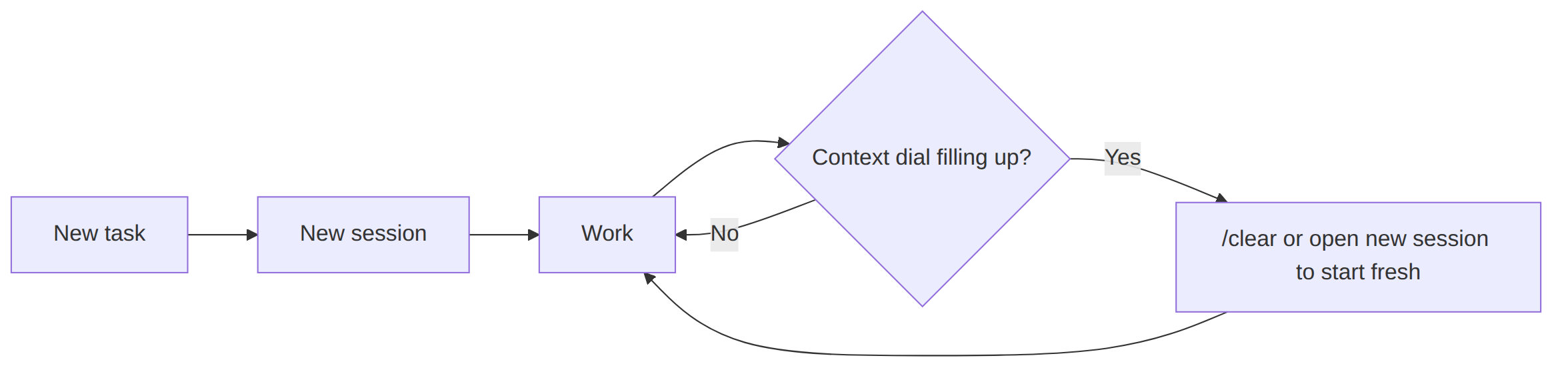
- Start a new session for each new task. Don't carry context from one task to the next.
- For complex work in a large repo, have Claude reproduce the relevant parts in a small standalone project. It works better when there's less code.
- Get out before the context fills up. You know that little dial at the bottom of the chat window that shows the context filling? I like to play a little game: clear the session before that meter fills. As it fills, Claude gets dumber, and when it fills completely you're forced into a compaction.
Three commands worth knowing:
/clearwipes the context./compactcompresses the context, but it loses information (it summarises what happened, and the summary misses details). It's still better than being forced into a compaction: you control when it happens, and you can give it hints on what information to preserve. Use it when you have to, but/clearand a fresh start is usually better./btwlets you ask a side question without polluting your main context.
Know your mode
Are you prototyping, or are you building for production? It matters, because it changes how much time and energy you need to invest in review and testing.
| Prototype | Production | |
|---|---|---|
| Prompts | Vague and large | Specific, precise and small |
| Review | Barely any | Careful |
| Design | Can be terrible | Needs to be maintainable |
| Result | Throwaway or refine it | Goes into production |
In prototyping mode (also known as vibe coding) we can generate large amounts of code without much review or testing. The code can be terrible and we don't really care.
In production mode we generate small, specific pieces of code, and we review and test carefully. As you move from prototype to production, become more specific about what you want at each step, and make your review more and more careful.
The important thing is simply knowing which mode you're in.
Plan before you code
You don't always need a plan. If you already know the exact outcome you want, just tell Claude to do that.
But for bigger projects where you don't quite know what to expect, planning minimises the surprises. This is where you'll want Claude's plan mode. A few things I've found that help:
- Read and understand the plan. You have to know it's good. There's no shortcut here.
- Write the plan to a markdown file, stage it in Git, and iterate on it with diffs.
- Have another Claude instance review the plan and write the problems it finds into the plan. Then have yet another instance fix those problems.
- Break big plans into smaller steps. Some plans are just too big for Claude to reliably follow (there's only so much context to go around).
- Plan in one chat, implement in another. This keeps the context smaller for each part.
- Make step one of the plan: write the documentation. Reading the docs before implementation starts is a great way to discover problems in the plan early.
- Ask Claude to "make a todo list". It really helps Claude not lose track of where it is.

Scale your process
Claude can do more than write code. You can use it to scale up your whole process.
Testing: Automated testing is easy now. Have AI write your tests, then review them carefully: you just have to be careful it doesn't fudge the tests to make them pass.
Refactoring: When we have good automated tests, refactoring is safe. You can let Claude refactor as much as it likes, so long as it doesn't break (or change) the tests.
Debugging: Give it the full picture. Ask for a repro case. And for difficult problems, resist the urge to ask for a fix. Instead, ask it to find and prove the root cause. Proof matters: without it, Claude will guess at a cause and start making random code changes. Once the root cause is proven, the fix is usually small and obvious.
Optimising: Measure and iterate. Frame rate, query time, memory usage, response size: anything you can measure, Claude can optimise. The key is that Claude can measure it by itself.
Documenting: I'm a big fan of documentation driven development (writing the doc before the code, so you and your colleagues can agree and spot problems before implementation). AI has had a big impact here for me. I can brain dump a disorganised list of bullet points, then progressively refine it into documentation. Just make sure you read the result. You have a duty not to force AI generated slop on your colleagues.
Give Claude the feedback loop
Claude is at its most powerful when you give it control of the entire feedback loop. Give it specific criteria for done and let it iterate until it gets there: failing tests it must make pass, or a metric it must improve. When Claude can check its own work, it can loop until the work is actually done.

How much freedom for Claude?
How much freedom we allow Claude depends on the work we are doing.
For well-known work, or a simple change repeated across repos, let Claude own it end to end: clone, create branch, code change, test, commit, push, create PR, even open the PR in the browser. This is fine because everything is visible and reversible.

For exploratory work, we need to stay more in control. Let AI make the code changes, but review and test before committing. Only commit when you're happy.
Be careful here. If Claude goes unchecked on non-trivial work, it will stack commit on commit, building on its mistakes each time. By the time you catch it, you've got a mess that's hard to untangle.
Git reset is your superpower
What's the first rule of being in a hole? Stop digging.
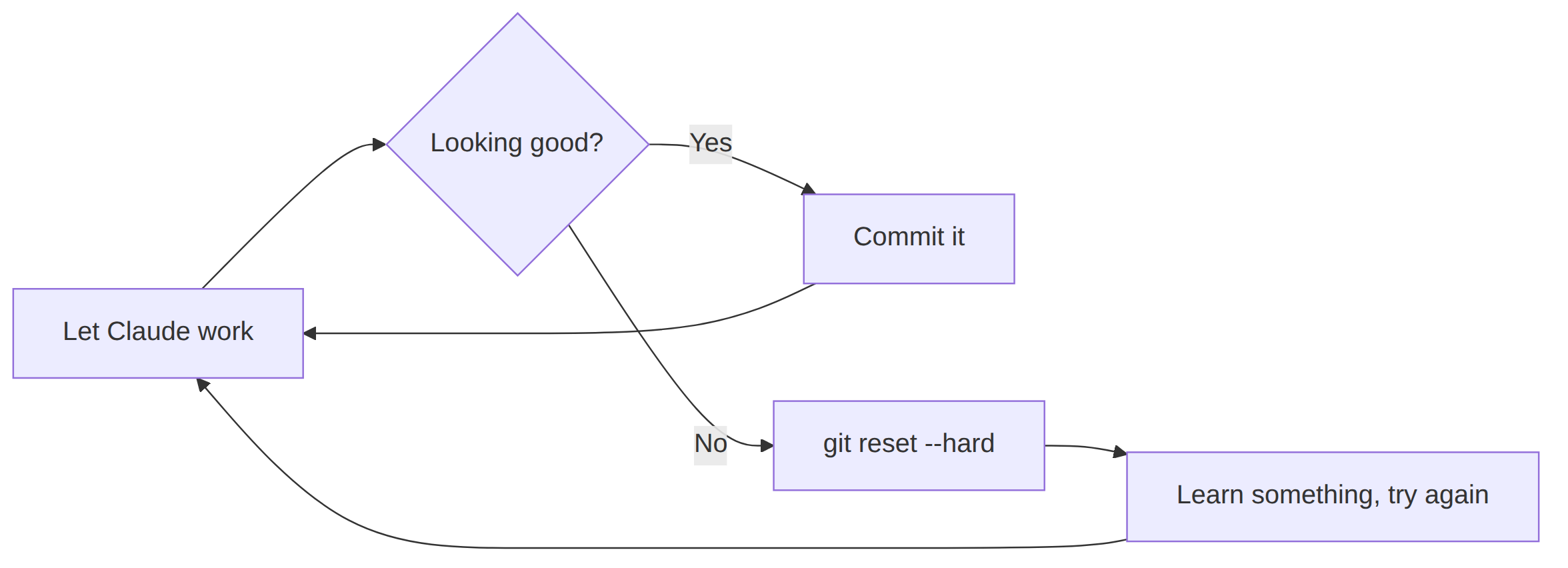
When AI has gone off the rails, there's no use grinding against the problem. Stop, walk away, rethink. Use /clear or /rewind, then git reset --hard back to a known-good state (this works best when you're making small commits and testing each one).
Easy come, easy go. AI wrote the code, and it costs almost nothing to regenerate it. Don't be afraid to throw it away and start again. You'll have learned something, and your next attempt will be better, with a clearer prompt, a smaller scope, or better testing.
Don't let AI touch anything you can't see
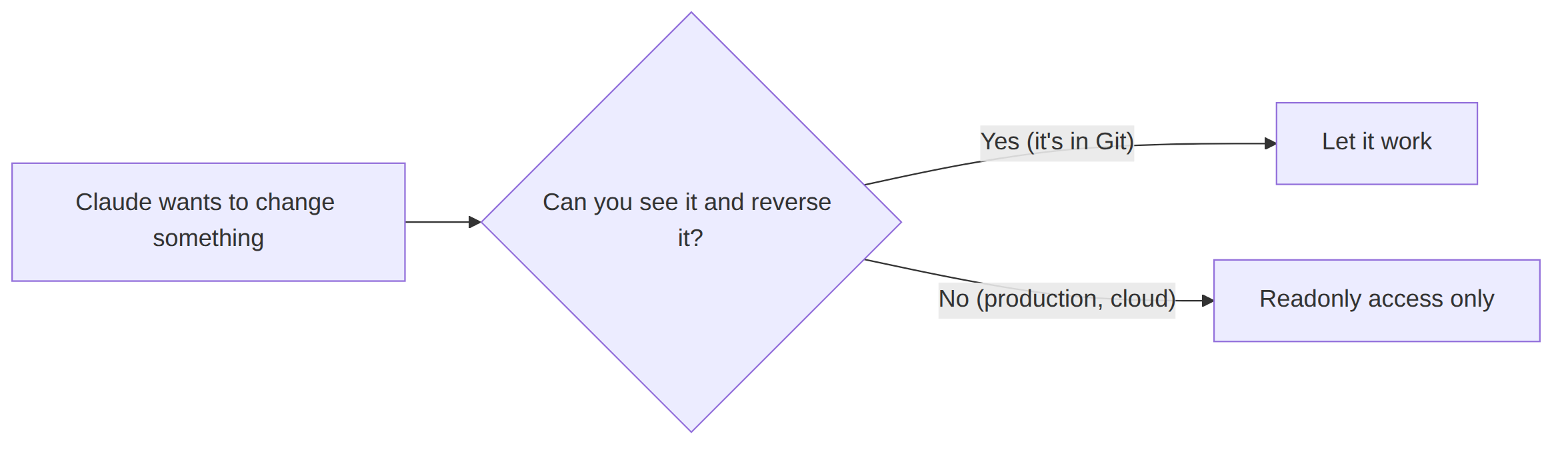
My most important rule: don't let AI change anything that you can't easily check or verify.
Git changes are safe: you can diff them, and you can roll them back. Production changes are very dangerous: Claude can easily break something in AWS or Kubernetes and you have no easy way to know what it did.
So:
- Don't give Claude write access to things it can break.
- Don't use
--dangerously-skip-permissions(this is acceptable with sandbox mode or isolated in a VM). - Don't enable auto permissions unless you really know what you're doing.
- Make access to fragile systems readonly. Be especially careful with production.
Whatever Claude does for you, verify it. Review the changes yourself. Run the automated tests. Have a second Claude instance review the work for a second opinion.
Always have a backup. If the code in your working directory is working, stage or commit it before you let Claude make another change. Who knows what Claude will do to your working code in the next iteration? You don't want to lose something you know is good. Even for a throwaway prototype, just use Git and commit whenever you have something that's working. This is the cheapest insurance you can get.
Configuring Claude Code
Now for a quick tour of the day-to-day Claude configuration, with some recommendations.
CLAUDE.md
A text file in the repo that describes your project to Claude. It goes into context, so keep it small. The key limitation: it's information and guidelines, not enforceable rules. Claude can and does ignore things in CLAUDE.md.
Verdict: always have one in your project.
Global configuration
You can share configuration and settings across all your projects by putting them in the .claude directory in your home directory: settings, skills, and a global CLAUDE.md. Project-level configuration sits alongside it and takes precedence. I keep my global config in a Git repo so it's backed up and easy to move between machines.
Verdict: put the settings and skills you want everywhere in your home directory.
Auto memory
Claude Code automatically saves things it thinks are important to local memory files. The problem: anything worth remembering should be in CLAUDE.md, committed to the repo, not hidden away on your laptop where it accumulates cruft and pollutes your context. Turn it off in your global settings: { "autoMemoryEnabled": false }.
Verdict: always turn it off.
Permissions
Pattern-matched allowlists that control what Claude can do. Add what you know to be safe. They're frustrating, difficult to configure and inflexible.
Verdict: useful but painful (try my permissions plugin instead).
Hooks
The reliable way to enforce rules on a project, like running automated tests at specific points in Claude's loop. Hooks work where CLAUDE.md doesn't, but they can be more annoying than useful.
Verdict: useful, but try skills first, or try my more sophisticated tools runner.
Worktrees
A Git feature that lets you run parallel AI tasks against one repo, each in an isolated copy. Sounds great in theory. In practice: merge conflicts, permissions that don't apply across directories, and the biggest problem, Claude forgetting it's in a worktree and editing the main repo.
Verdict: promising, but avoid the complexity for now. To parallelise, just make multiple clones of the repo.
Stay tuned: I'll be talking more about loop engineering and worktrees for parallel agents soon on my blog and YouTube.
Skills
Custom commands for things you do frequently. Add <skill>.md to .claude/commands/ and invoke with /<skill>. A great way to refactor a bloated CLAUDE.md is to move routines into skill files.
Verdict: if you haven't yet created some skills, this is the most useful thing you should do right now.
Key takeaways
- You own the AI's output. Review it, test it, understand it like your own code.
- Manage your context: small sessions, small CLAUDE.md, new task in a new chat.
- Plan before you code. It's the single biggest thing you can do to avoid wasted effort.
- Step one of any plan: write the documentation.
- "Make a todo list."
- Give Claude the feedback loop: tell it to run the tests and not stop until they pass.
git resetis your superpower. Easy come, easy go.- Don't let AI touch anything you can't see or diff (especially production).
- Ask for the root cause, not a fix.
And one final pro tip: just keep asking questions. "How does this repo work?" "Why did you add this?" "Do we need that?" Keep getting more specific, and Claude gives you the answer you want.