How do you stop your AI agent committing code that doesn't work?
No matter how much you plead with it, your agent won't reliably run the tests before it commits. Mine doesn't and recently it produced a run of broken commits that I then had to unpick.
I had never bothered with Git hooks before. I was happy running the tests myself before committing, because I was the one doing the committing.
Now with AI writing code and regularly committing for me, Git hooks are a great way to prevent it from committing bad code.
This post shows you how to make your repository refuse a bad commit without adding a big wait before every commit.
This blog post accompanies the video: https://youtu.be/XalyUa_HFx4
Broken commits pile up
When AI is left to commit code without checking that the automated tests are passing, it's eventually going to give you a run of broken commits. Figure 1 shows how this happens.

Figure 1. Broken commits piling up.
Once you have a run of these it's not so easy to know where the problem was introduced. And it's a bit of a mess to unpick. Bisect isn't much use when half the history is broken. And there's no good commit to roll back to. If you roll back you risk losing some work that would be good if only the tests were passing.
It's really important to keep our automated tests working on every commit. I always believed this. Now I just have to convince my friend Claude.
What I tried first
I'm going to mention Claude a lot in this post. Most of this is just Git though, so it works with Cursor or whatever else you use.
First I tried asking nicely. A rule in CLAUDE.md (or AGENTS.md, depending on your tool) saying "run the automated tests before you commit". It's worth having that rule anyway, but it isn't enough, because Claude tends to forget what's written in there. Everything in those files is a guideline, not a rule the tooling enforces. I wrote about that (and the rest of my Claude configuration) in How to AI.
Next I tried a Claude stop hook that ran the tests every time the agent stopped. The work for that is claude-tools-runner on my GitHub. It still has potential, but I stopped using it because it's annoying to have your agent run the whole test suite at every stopping point.
Then Claude gave me that run of broken commits. A Git pre-commit hook was the obvious answer.
Getting the code
There are two example repositories that go with this post. Clone them and follow along:
git clone https://github.com/ashleydavis/git-pre-commit-hook-examplegit clone https://github.com/ashleydavis/what-changed-exampleBoth ship with an install script for the Git pre-commit hook and a failing test, so you can quickly install the hook, try to commit and see the commit refused because of the failing test.
Make the repository refuse
The way this works is that you configure Git to run a script before every commit. Your script runs the tests. If they fail, the script exits with a non-zero code and Git refuses to create the commit. You can see this in Figure 2.
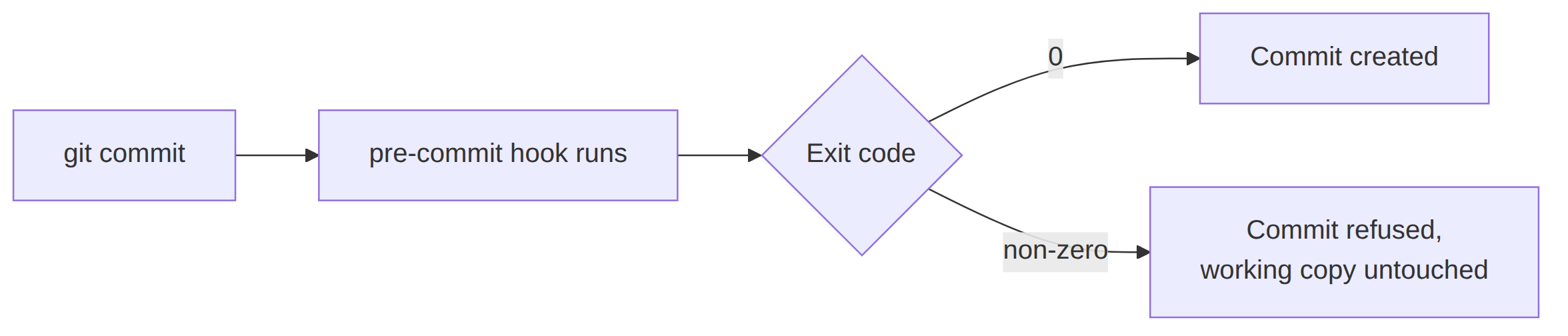
Figure 2. The pre-commit hook decides whether the commit happens.
A refused commit doesn't lose anything. The code is still sitting there exactly as it was left, just waiting for someone (e.g. your AI agent) to fix the failing tests.
A basic pre-commit hook
Here's the simplest hook that does the job. Save it as .git/hooks/pre-commit and make it executable:
# .git/hooks/pre-commit
set -euo pipefail

if ! npm test; then
    echo "pre-commit: REFUSED. Fix the failure above and commit again." >&2
    exit 1
fi
This example is for a Node.js project, so it runs npm test. You can imagine what it looks like for Python, Go or whatever language or test framework you are using. The script can do anything you want: compile, lint, type check, run a subset of tests. All Git cares about is the exit code.
The set -euo pipefail line is worth understanding, because it's what carries a test failure up to Git:
-eends the script at the first command that fails.-utreats an unset variable as an error, so a typo in a variable name fails loudly instead of expanding to nothing.-o pipefailfails a pipeline when any command in it fails, not just the last one. Without it,failing-command | tee loglooks like a success.
Now install it and try to commit broken code. The test runs, the test fails and the commit doesn't happen. Run git status afterwards to see your change is still staged and not committed.
Downside: nothing installs it for you
Git looks for hooks in .git/hooks. That directory lives inside .git, so it isn't part of the repository, it isn't committed and it doesn't come down with a fresh clone.
So we should keep our hook scripts somewhere that is committed. I like to use a directory called .githooks. Then point Git at it:
git config core.hooksPath .githooksThat setting is written to Git config for this clone of the repo. Every fresh clone of the repo has to run that command again.
It would be nice if Git managed this for us. It doesn't, so we can ship an install script with our repo:
# scripts/install-hooks.sh
set -euo pipefail

chmod +x .githooks/pre-commit

git config core.hooksPath .githooks

echo "Hooks installed: core.hooksPath = $(git config --get core.hooksPath)"
So on any fresh clone I just have to remember to run ./scripts/install-hooks.sh. From then on I'm protected against the AI's shonky commits.
Downside: now every commit waits
The hook works, but there's still a problem. The thing I never liked about a Git pre-commit hook is the time it adds to every commit. Figure 3 illustrates.
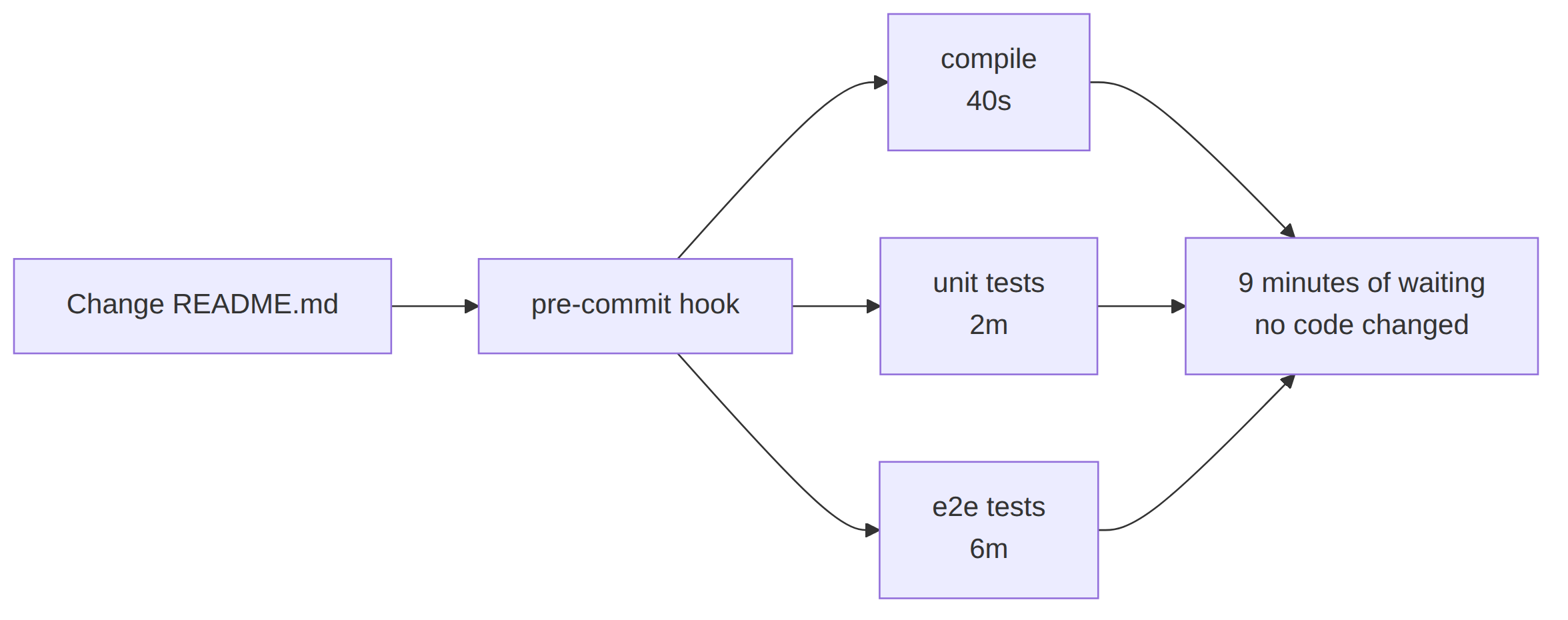
Figure 3. Every commit pays for every test.
Running the full suite on every commit is expensive, especially once you have end to end or smoke tests. And it's most annoying when you're changing something like documentation, which doesn't even affect code or tests.
Only run what the change affects
So I wrote a small tool called what-changed. It's a generalisation of the idea behind claude-tools-runner.
It answers one question: since the point I last recorded as good, which files have changed and which of my build and test targets do I need to run?
Here's an example of its output:
$ what-changed summary

Changed since the baseline:

  compile: 2 changed
    M  a5e4d212f14f3cc1  src/parser/lexer.ts
    A  0f15384d18789b1e  src/parser/new.ts

  test: 2 changed
    M  a5e4d212f14f3cc1  src/parser/lexer.ts
    A  0f15384d18789b1e  src/parser/new.ts

  e2e: unchanged
The e2e target is unchanged, so there's no reason to run it. The pre-commit hook can skip it and let the commit through sooner.
For this to work, when we run a passing test suite, we must update the last good baseline. Then when it comes to the pre-commit hook we don't have to run those tests again, because they are already recorded as having passed.
Here's how to use it. First the configuration, which names the targets and the paths that affect those targets:
# what-changed.yaml

always:
  - package.json

ignore:
  - .md

targets:
  - name: test
    paths:
      - src
      - test

  - name: e2e
    paths:
      - src
      - e2e
And now a "test everything" shell script to run from the pre-commit hook. It invokes what-changed to list the affected targets and then runs only the tests for those targets:
# scripts/test-everything.sh

for TARGET_NAME in $(what-changed targets); do
    case "$TARGET_NAME" in
        test) npm test ;;
        e2e)  npm run e2e ;;
    esac
done
Normally I like this script to run all the affected targets in parallel and bail out the moment any of them fails. But this version here is simplified, to be easy to understand.
Figure 4 shows the hook with what-changed in front of it.

Figure 4. Only the affected targets run.
Tell the agent what's going on
There's one more thing we have to do. We have to tell the AI agent the way we're doing things now.
When it finds it can't commit because of the hook, it's probably going to bypass the hook or rather unhelpfully remove it for you.
So give the AI some new guidelines:
# CLAUDE.md (or AGENTS.md)

- If the hook refuses a commit, the code is broken. Fix the code.
- Never use `--no-verify`.
- Never unset `core.hooksPath`.
- Bypassing the hook is not allowed under any circumstances.
- Never commit with tests failing.
- Never remove or skip tests to bypass the problem.
Of course, Claude can ignore such guidelines. If you want to be really sure the AI can't bypass or remove the hook, you could block --no-verify with a PreToolUse hook. But I haven't needed to go that far yet.
Conclusion
- If broken AI commits are piling up in your repository, use a pre-commit hook.
- Use an install script to make it easy to install your hooks on a fresh repo clone.
- If the tests take too long, consider using what-changed to cut the targets down to only what the change affects.
Go forth and conquer.
Links
- Example of the basic hook: github.com/ashleydavis/git-pre-commit-hook-example
- Example of using what-changed: github.com/ashleydavis/what-changed-example
- what-changed: github.com/ashleydavis/what-changed
- claude-tools-runner, the predecessor to what-changed: github.com/ashleydavis/claude-tools-runner
- Git hooks reference: git-scm.com/docs/githooks
- My earlier post on working with AI: How to AI